2.1 Basic Function of Computer
The fundamental operation of any computer is built upon the IPOS cycle (Input, Process, Output, and Storage). At its simplest level, a computer functions as a data processor that follows a sequence of logical steps:
- Data Acceptance: It receives raw data (unorganized facts) from the outside world through input devices.
- Data Processing: It manipulates that data according to a set of instructions (software) to perform calculations, comparisons, or logical decisions.
- Information Output: It presents the results of the processing in a human-readable format, such as text on a screen or a printed document.
- Data Persistence: It saves the information for future retrieval so it isn't lost when the power is turned off.
2.2 Basic Functional Organization of Computer
The functional organization refers to how the hardware components are logically arranged to communicate with each other. This is often represented by a block diagram showing the flow of data and control signals.
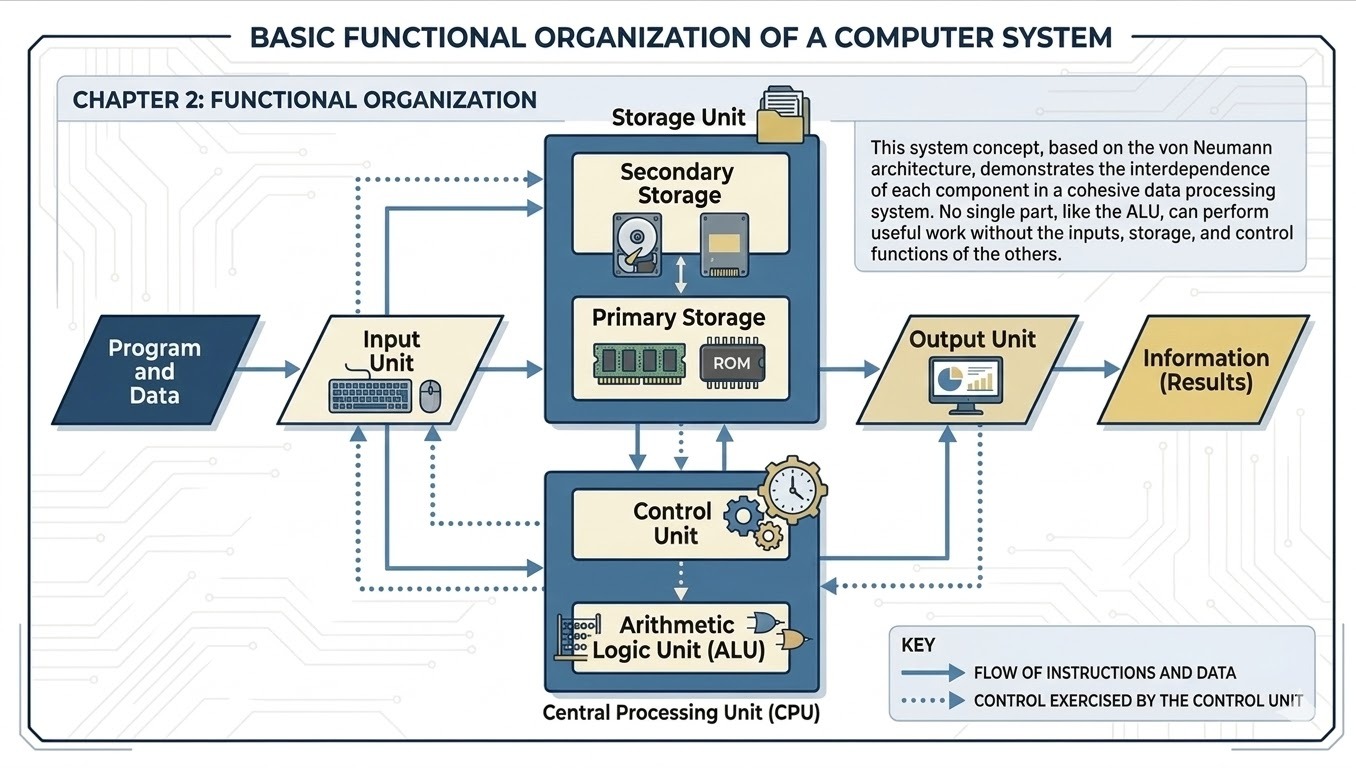
Input Unit
The input unit is the gateway between the user and the computer. It consists of devices like keyboards, mice, scanners, and microphones. Its primary functions are:
- Receiving data from the external world.
- Converting this data into a digital format (binary) that the computer can understand.
- Sending the converted data to the storage unit or the CPU for immediate processing.
The functional components of a computer system are categorized into processing, storage, and output units. Each plays a specific role in the transformation of raw data into meaningful information.
Processing Unit
The processing unit, or Central Processing Unit (CPU), is the primary component that executes instructions and manages the flow of data. It is composed of three essential sub-units:
- Control Unit (CU): The Control Unit acts as the manager of the entire computer system. It does not process data itself but instead fetches instructions from memory, decodes them, and directs the flow of data between the ALU, registers, and other input/output devices by sending timed control signals.
- Arithmetic and Logic Unit (ALU): This is the part of the CPU where actual data processing occurs. The ALU performs arithmetic operations like addition and multiplication, as well as logical operations such as comparing two numbers to see which is greater or determining if a condition is "TRUE" or "FALSE."
- Register: Registers are small, extremely high-speed storage locations located directly inside the CPU. They are used to hold the specific data, instructions, or memory addresses that the CPU is currently working on. Because they are physically closer to the processing logic than RAM, they allow for near-instantaneous data access during execution.
Storage
A storage device is a fundamental hardware component used for recording, retaining, and retrieving digital data. It serves as the computer's memory, allowing it to keep the operating system, software applications, and user files accessible for future use. These devices are categorized into primary memory, like RAM, which handles active tasks, and secondary memory, like hard drives, for permanent storage. Unlike primary memory, which is usually volatile and loses data when powered off, secondary storage is non-volatile and keeps information safe without electricity. Data in storage is organized into bits and bytes, often reaching capacities of several terabytes in modern systems. While the CPU cannot access secondary storage directly, it retrieves the necessary data by first loading it into the much faster main memory. Common examples of these technologies include magnetic hard disks, optical discs like DVDs, and high-speed solid-state drives. They play a critical role in the information processing cycle by ensuring that processed results are preserved. Modern advancements have led to the widespread use of flash memory and cloud-based storage for increased mobility and speed. Ultimately, the reliability and capacity of a storage device determine how much information a computer can manage and how safely that data is stored over time.
Output
The output unit is responsible for translating the computer's binary results into a format that humans can understand.
- Softcopy Output: This refers to an intangible, electronic version of output that is displayed on a screen or heard through speakers. It is temporary and dynamic; as soon as the monitor is turned off or the audio stops playing, the output is gone. It is ideal for tasks that require constant updates, like browsing the web or watching a video.
- Hardcopy Output: This is a permanent, physical version of output recorded on a medium like paper or cloth. It is produced by devices such as printers and plotters. Unlike softcopy, hardcopy output can be read and shared without needing an electronic device or a power source, making it essential for legal documents and physical record-keeping.
Softcopy | Hardcopy |
|---|---|
An intangible, electronic version of output displayed on a screen or heard through speakers. | A permanent, physical version of output recorded on a medium like paper or cloth. |
Temporary and dynamic; it disappears when the device is turned off or the file is closed. | Permanent and stable; it exists independently of the computer once produced. |
Produced by devices such as monitors, projectors, and speakers. | Produced by devices such as printers and plotters. |
Requires an electronic device and power source to be viewed or used. | Can be easily carried, read, and shared without any electronic device or power. |
Easily modified or updated in real-time within the software. | Cannot be easily modified once printed; changes require a new printout. |
Stored digitally on primary or secondary storage media. | Stored physically in files, folders, or archives. |
Generally lower cost per view as it does not require physical consumables. | Higher cost per unit due to the need for paper, ink, or toner. |
Ideal for multimedia, web browsing, and tasks requiring frequent updates. | Essential for legal documents, physical record-keeping, and offline reading. |
2.3 The System Concept
The "System Concept" is the idea that a computer is not just a collection of independent parts, but an integrated whole where the components work together toward a common goal. A system is defined by:
- Interdependence: The Input unit is useless without the CPU to process the data, and the CPU is useless without Storage to hold instructions.
- Synergy: The performance of the system is greater than the sum of its parts.
- Common Objective: Every component exists to serve the purpose of processing data and providing output to the user.
- Hardware and Software Integration: The system concept also includes the relationship between the physical machine (hardware) and the instructions that tell it what to do (software).