A computer is an advanced electronic device that takes raw data as input from the user and processes it under the control of a set of instructions (called a program), produces a result (output), and saves it for future use.
At its core, a computer performs four basic operations:
Input: Capturing data (text, sound, images).
Processing: Manipulating data according to instructions (via the CPU)
Output: Displaying information in a human-readable form.
Storage: Keeping data permanently on disks or drives.
IPO Cycle
The Input-Process-Output (IPO) cycle is a fundamental concept in computer science that describes how data is transformed into information. It represents the logical structure of how every computer program and system operates.
The Stages of the IPO Cycle
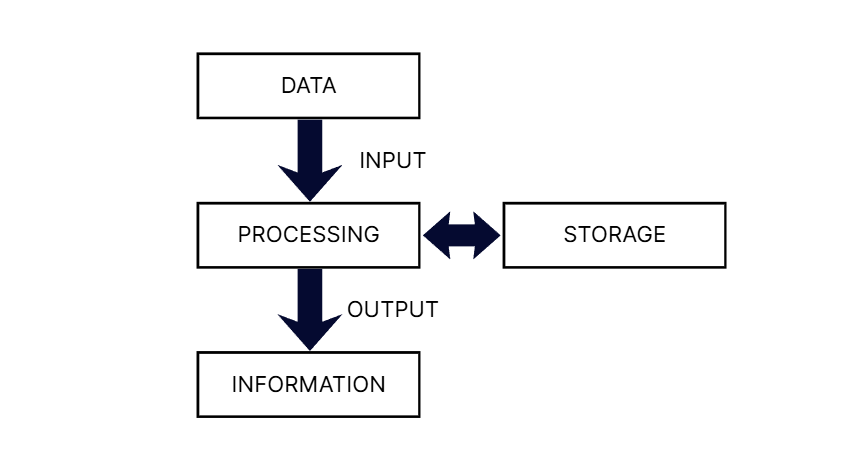
- Input: This is the initial stage where raw data is entered into the computer system. Data can be in various forms, such as text, numbers, images, or sound. Input devices, such as keyboards, mice, scanners, and microphones, are used to capture this data and convert it into a digital format that the computer can understand.
- Process: In this stage, the computer's central processing unit (CPU) performs operations on the input data according to a set of instructions (a program). Processing can involve various tasks, such as mathematical calculations, logical comparisons, data sorting, and information searching. The CPU uses its internal components, like the Arithmetic Logic Unit (ALU) and Control Unit (CU), to carry out these operations.
- Output: After the data has been processed, the resulting information is presented to the user in a human-readable form. Output devices, such as monitors, printers, and speakers, are used to display or produce this information. Output can take the form of text on a screen, a printed report, an image, or sound.
- Storage (Optional but Essential): Often considered a fourth stage (IPOS), storage involves saving the processed information for future use. This is necessary because the computer's primary memory (RAM) is volatile, meaning its contents are lost when the power is turned off. Secondary storage devices, such as hard drives, solid-state drives, and cloud storage, provide permanent storage for data and programs.
History of the Computer
The history of the computer is a fascinating journey spanning thousands of years, moving from simple manual tools to today's "invisible" artificial intelligence. It can be broken down into three major eras: The Mechanical Era, the Electronic Era, and the Modern Era.
The Mechanical Era (c. 3000 BC – 1940s)
Before electricity, humans used physical mechanisms to automate math.
- The Abacus (c. 3000 BC): The earliest "calculator." It used beads on rods to help with addition and subtraction. It is still used in some parts of the world today to teach arithmetic.
- Napier’s Bones (1617): John Napier invented a set of rods to simplify multiplication and division using logarithms.
- The Pascaline (1642): Blaise Pascal invented the first mechanical calculator that used a system of gears and wheels.
- Babbage’s Engines (1822–1837): Charles Babbage designed the Difference Engine and the Analytical Engine. Though never fully built in his lifetime, his designs included a "Mill" (processor) and a "Store" (memory), earning him the title "The Father of the Computer."
- Ada Lovelace (1843): She worked with Babbage and wrote the first-ever algorithm intended for a machine. She is recognized as the first computer programmer.
The Electronic Era (1940s – 1970s)
This era was triggered by World War II and the invention of electronic components that replaced slow mechanical gears.
- ENIAC (1945): The Electronic Numerical Integrator and Computer was the first general-purpose electronic computer. It was massive—occupying 1,800 square feet and using 18,000 vacuum tubes.
- The Transistor (1947): Scientists at Bell Labs invented the transistor. This was the single most important event in computer history. It replaced the hot, fragile vacuum tubes, making computers smaller, faster, and much more reliable.
- Integrated Circuits (1958): Jack Kilby and Robert Noyce figured out how to fit multiple transistors onto a single silicon chip. This led to the "miniaturization" of technology.
The Modern Era (1970s – Present)
This is when computers moved from specialized labs into our homes and pockets.
Microprocessors (1971): Intel released the 4004 chip, which put an entire CPU on a single tiny chip. This gave birth to the Personal Computer (PC).
- The PC Revolution (1980s): Companies like Apple, IBM, and Microsoft made computers accessible to the average person. The Graphical User Interface (GUI) and the "mouse" replaced complex text commands.
- The Internet & Connectivity (1990s): Computers stopped being isolated machines. They became gateways to a global network, fundamentally changing how humans communicate and access information.
- Mobile & Cloud Computing (2000s – 2010s): Computers shrank into smartphones (like the iPhone in 2007). Data moved from local hard drives to the "Cloud," allowing us to access our files from anywhere.
- AI and Quantum Era (Current): We are now in a time where computers don't just follow rules; they "learn" through Artificial Intelligence. Future Quantum Computers promise to solve problems in seconds that would take current supercomputers thousands of years.
Generation of Computers
The "generations" of computers refer to the major technological stages in the evolution of computing. Each generation is defined by a specific breakthrough in the core electronic component used to build the machine, which has made computers smaller, faster, cheaper, and more efficient.
First Generation (1940–1956): Vacuum Tubes
These were the pioneers of electronic computing, but they were more like experimental laboratory equipment than modern PCs. Examples: ENIAC, UNIVAC I.
- Characteristics:
- Used vacuum tubes for circuitry and magnetic drums for memory.
- Relied on Machine Language ($0s$ and $1s$) for programming.
- Input was based on punched cards and paper tape.
- Advantages:
- It was the only electronic switching device available at the time.
- Could perform calculations in milliseconds (much faster than mechanical tools).
- Disadvantages:
- Size: Occupied entire rooms (e.g., ENIAC weighed 30 tons).
- Heat: Produced massive amounts of heat, often causing tubes to burst.
- Reliability: Very low; constant maintenance was required.
- Cost: Extremely expensive to build and operate.
Second Generation (1956–1963): Transistors
The transition to transistors made computers smaller, faster, and more reliable. Examples: IBM 7094, CDC 1604.
- Characteristics:
- Used transistors instead of vacuum tubes.
- Used magnetic core technology for primary memory.
- Introduction of Assembly Language and early high-level languages (COBOL, FORTRAN).
- Advantages:
- Portability: Significantly smaller than the first generation.
- Efficiency: Consumed less power and generated less heat.
- Speed: Calculations were now measured in microseconds.
- Disadvantages:
- Still required sophisticated air conditioning systems.
- Commercial production was difficult and expensive.
- Required manual assembly of individual transistors into circuits.
Third Generation (1964–1971): Integrated Circuits (IC)
The invention of the "chip" (Integrated Circuit) allowed engineers to pack hundreds of transistors onto a single silicon wafer. Examples: IBM 360 series, PDP-8.
- Characteristics:
- Used Integrated Circuits (ICs).
- Users interacted via keyboards and monitors rather than punched cards.
- Managed by an Operating System, allowing for "multiprogramming."
- Advantages:
- Reliability: Much less prone to hardware failure than previous eras.
- Size: Small enough to fit on a desk (Minicomputers).
- Cost: Mass production became possible, lowering the price.
- Disadvantages:
- The IC chips themselves were highly complex to manufacture.
- Highly specialized facilities were needed to maintain a dust-free environment for chip production.
Fourth Generation (1971–Present): Microprocessors
This generation brought the power of a computer to the individual person through VLSI (Very Large Scale Integration). Examples: Apple Macintosh, IBM PC, modern Intel/AMD based laptops.
Characteristics:
- Used Microprocessors (thousands of ICs on a single silicon chip).
- Introduction of the Graphical User Interface (GUI), mouse, and handheld devices.
- Development of local area networks (LAN) and the early Internet.
- Advantages:
- Size: Extremely small and portable (Laptops, Smartphones).
- Speed: Can perform billions of operations per second ($GigaHertz$).
- Ease of Use: No specialized training is required to operate them.
- Disadvantages:
- The design and fabrication of microprocessors are extremely sophisticated and require high-tech infrastructure.
- High dependency on the software industry to utilize the hardware's power.
Fifth Generation (Present & Future): Artificial Intelligence
This generation aims to create machines that can simulate human intelligence. Examples: Google Assistant, Alexa, IBM’s Watson, and advanced Neural Networks.
- Characteristics:
- Based on ULSI (Ultra Large Scale Integration) and Parallel Processing.
- Includes Natural Language Processing (NLP) and robotics.
- Integration of Quantum Computing and Nanotechnology.
- Advantages:
- Intelligence: Capable of learning, reasoning, and self-correction.
- Interaction: Humans can communicate with computers in plain language (voice/text).
- Decision Making: Can solve complex, unstructured problems (like medical diagnosis).
- Disadvantages:
- Complexity: Programming AI is incredibly difficult and requires massive data sets.
- Ethical Concerns: Issues regarding privacy, job displacement, and machine autonomy.
- Energy: Large-scale AI models require massive amounts of electricity for training.
1.4 Types of Computer
The evolution of personal computing was fundamentally shaped by the competition and technological philosophies of three distinct market categories: the original IBM PC, the IBM-compatible clones, and the Apple Macintosh. Each of these represents a different approach to how hardware and software should interact with the end user.
On the basis of working principle
When classifying computers based on their working principle, we categorize them by the fundamental physics and logic they use to process information. This distinguishes between systems that measure physical changes and those that count discrete numbers.
Analog Computers
Analog computers are specialized machines that do not operate on numbers or digits in the traditional sense; instead, they process continuous physical quantities. These variables include things like voltage, hydraulic pressure, temperature, or mechanical rotation. An analog computer works by measuring these physical states constantly and providing a real-time output that reflects the current input. Because they represent data as a continuous range of values—much like a wave—they are incredibly fast for specific tasks but lack the high precision of modern digital systems. Their accuracy is limited by the physical quality of their internal components, such as the friction in a gear or the resistance in a wire. Common examples include a traditional car speedometer, which measures the rotation of wheels, or a mercury thermometer, which measures the expansion of a liquid.
Digital Computers
Digital computers are the most prevalent type of computing technology in the world today, found in everything from smartphones to supercomputers. Unlike analog systems, they process data in discrete steps using the binary system, which consists of a series of $0s$ and $1s$. Every piece of data—whether it is a text document, a high-definition video, or a complex scientific formula—is converted into this digital code before the Central Processing Unit (CPU) manipulates it. Digital computers are characterized by their immense accuracy, vast memory storage, and extreme versatility; a single machine can switch from being a calculator to a video editing suite simply by changing its software. Because they rely on electronic switches called transistors that are either "On" or "Off," they can perform billions of logical operations per second with perfect mathematical precision.
Analog Computer | Digital Computer |
|---|---|
It processes continuous physical quantities (e.g., voltage, temperature, pressure). | Processes discrete data in the form of digits (0 and 1). |
It measures the continuous change in physical attributes. | It counts and calculates based on binary logic. |
Provides an approximate result due to physical limitations (friction, heat). | Provides highly accurate and precise results. |
Extremely fast because it processes data in real-time without conversion. | Slower than analog for real-time sensing because it must convert data to binary. |
Has very limited or no memory; it displays results as they happen. | Has vast storage capacity (Hard drives, SSDs) for permanent data. |
Not flexible; they are usually hard-wired for a specific task. | Highly flexible; can run millions of different software programs. |
Results are usually shown on dials, scales, or graphs (e.g., a needle moving). | Results are displayed as numbers, text, or images on a digital screen. |
Speedometer, mercury thermometer, old flight simulators. | Laptops, smartphones, calculators, digital watches. |
Hybrid Computers
Hybrid computers are advanced systems designed to bridge the gap between the speed of analog measurement and the precision of digital processing. As the name implies, they combine the features of both: they use analog components to capture and measure continuous physical signals from the environment and then use digital components to process and store that information. This makes them ideal for complex, high-stakes environments where real-time monitoring must be paired with accurate data analysis. For instance, in an Intensive Care Unit (ICU), a heart monitor acts as a hybrid computer by measuring the continuous electrical signals of a patient's heart (analog) and then converting those signals into digital data to be displayed as numbers and stored in a medical database. They are also widely used in industrial plants and weather forecasting stations to manage physical sensors alongside complex mathematical models.
On the basis of size
When classifying computers based on their physical size, we are also describing a hierarchy of processing power, memory capacity, and cost. This spectrum ranges from massive, room-sized systems that serve global scientific needs to tiny, pocket-sized devices meant for individual use.
Supercomputers
Supercomputers are the most powerful and expensive machines in existence, designed specifically to handle massive mathematical calculations that would overwhelm any other type of computer. Unlike standard systems, they utilize parallel processing, where thousands of processors work together on a single task simultaneously. This allows them to perform quintillions of calculations per second, a speed measured in FLOPS (Floating Point Operations Per Second). Because of their immense power and the heat they generate, they are often housed in specialized, climate-controlled data centers. They are primarily used for high-stakes scientific work, such as weather forecasting, climate research, molecular modeling, and nuclear fusion simulations.
Mainframe Computers
Mainframe computers are large, powerful systems built for "high-volume" data processing and extreme reliability rather than raw calculation speed for a single task. While a supercomputer might focus on one complex problem, a mainframe is designed to handle thousands of different tasks and millions of transactions for thousands of users at the same time. They are the backbone of large-scale organizations like banks, insurance companies, and government agencies because they are designed for "high availability," meaning they can run for years without ever being shut down. Their primary strength lies in their ability to manage massive databases and ensure that every transaction is processed securely and accurately.
Minicomputers (Mid-range Servers)
Minicomputers, which are now more commonly referred to as mid-range servers, sit in the middle of the hierarchy between mainframes and personal computers. They were originally developed in the 1960s to offer a more affordable computing solution for small-to-medium-sized businesses that did not require the massive scale of a mainframe. A minicomputer is typically used to manage a specific department's needs, such as a company’s local network, a manufacturing production line, or a scientific laboratory's data. While they are significantly smaller and less expensive than mainframes, they still possess enough power to support multiple users—usually ranging from four to two hundred—simultaneously.
Microcomputers
Microcomputers are the most common type of computer today, characterized by the use of a microprocessor as their central processing unit. These are designed for individual use and are highly versatile, capable of running a vast array of software from word processors to high-end video games. The category includes desktop computers, laptops, tablets, and even smartphones. Because they are mass-produced, they are the most affordable and portable computers available. Despite their small size, modern microcomputers are often more powerful than the mainframes of previous decades, allowing everyday users to perform complex tasks like video editing and 3D design from their own homes.
On the basis of Brand
The evolution of personal computing was fundamentally shaped by the competition and technological philosophies of three distinct market categories: the original IBM PC, the IBM-compatible clones, and the Apple Macintosh. Each of these represents a different approach to how hardware and software should interact with the end user.
The IBM PC Standard
In 1981, the release of the IBM Model 5150 changed the landscape of the tech industry by legitimizing the personal computer for business and professional use. IBM took a revolutionary approach by utilizing "open architecture," meaning they designed the system using off-the-shelf components from other manufacturers, such as Intel processors, rather than building every part from scratch. This decision invited third-party developers to create hardware expansion cards and software, making the IBM PC the immediate standard for office environments. By choosing an open design, IBM established a massive ecosystem where the operating system, PC-DOS, became the backbone of modern corporate computing.
The IBM Compatible
The success of IBM's open architecture accidentally birthed a massive market of "IBM Compatibles," often referred to as PC clones. Because IBM’s hardware specifications were not proprietary, other manufacturers like Dell, and HP realized they could reverse-engineer the architecture to create computers that performed exactly like an IBM PC but were often cheaper or faster. These companies licensed MS-DOS or later versions of Windows from Microsoft, ensuring that any software written for an IBM PC would run perfectly on their machines. This period of rapid innovation created a highly competitive market that drove prices down and solidified the "PC" as the universal computing platform for the next several decades.
Apple Macintosh
In variance to the open landscape of IBM and its clones, Apple took a "closed architecture" approach with the launch of the Macintosh in 1984. Apple believed that by controlling both the hardware and the software, they could create a seamless, high-quality user experience that was impossible to achieve with a fragmented market of different PC manufacturers. The Macintosh was defined by its Graphical User Interface (GUI), which introduced the world to the mouse, clickable icons, and folders, moving computing away from the complex text-based command lines of IBM systems. While this approach made the hardware difficult or impossible to upgrade compared to an IBM-compatible PC, it fostered a reputation for stability, ease of use, and superior design, cementing the Mac as the preferred tool for creative professionals, artists, and educators.
On the basis of processor used
The classification of computers based on the processor and architecture used marks the transition from early hobbyist machines to the standardized business and personal systems we use today. These categories—XT, AT, and PS/2—represent the historical evolution of the IBM PC lineage and the technological leaps in processing speed, data bus width, and hardware compatibility.
XT (Extended Technology)
The IBM PC/XT, introduced in 1983, was the first significant evolution of the original personal computer. It was based on the Intel 8088 microprocessor, which featured an internal 16-bit architecture but communicated with other components via an 8-bit data bus. The "Extended Technology" moniker referred to the addition of a built-in 10MB hard drive, which was a massive leap forward from the floppy-disk-only systems of the era. XT systems used the 8-bit Industry Standard Architecture (ISA) bus for expansion cards and typically ran at a clock speed of 4.77 MHz. While revolutionary for its time, the XT was limited by its slow processing speed and the inability to address more than 1MB of system memory, leading to its eventual replacement by more robust architectures.
AT (Advanced Technology)
The introduction of the IBM PC/AT in 1984 marked the beginning of the "modern" PC era by utilizing the much more powerful Intel 80286 processor. This "Advanced Technology" shifted the industry to a true 16-bit data bus, allowing the computer to process twice as much information at once compared to the XT. The AT architecture introduced a 16-bit version of the ISA bus, which became the standard for hardware expansion for over a decade. Additionally, the AT allowed for significantly more RAM (up to 16MB) and faster clock speeds, initially starting at 6 MHz and eventually reaching 20 MHz. The AT also standardized the "AT" motherboard form factor and the CMOS battery-backed clock, features that influenced computer design well into the late 1990s.
PS/2 (Personal System/2)
Released in 1987, the IBM PS/2 was an attempt to regain control over the PC market by introducing a more sophisticated, proprietary architecture. Unlike the XT and AT, which used the open ISA bus, the high-end PS/2 models featured the Micro Channel Architecture (MCA), which was faster and supported "Plug and Play" features long before they became common. The PS/2 series used a variety of processors, ranging from the 8086 to the powerful 80386. Perhaps its most lasting legacy was the introduction of standardized ports that we still recognize today, such as the 3.5-inch floppy disk drive, the VGA video standard, and the "PS/2" circular ports for mice and keyboards. While the MCA bus eventually lost out to cheaper alternatives, the PS/2 established many of the hardware interfaces that defined the personal computer experience for the next twenty years.
1.5 Characteristics of computer
These characteristics are the "why" behind the computer's dominance. The "personality" of a computer is defined by its ability to surpass human limitations in specific, measurable ways:
- Speed: Computers can perform millions of instructions per second ($MIPS$). Calculations that would take a human a lifetime are completed in a fraction of a second.
- Accuracy: If the input data is correct, the result is 100% error-free. Errors are almost always due to human "Garbage In, Garbage Out" (GIGO) rather than machine failure.
- Diligence: Unlike humans, computers do not suffer from fatigue, boredom, or lack of concentration. They can perform the same task repeatedly for days with the exact same precision.
- Versatility: A computer is a multi-purpose machine. It can switch from being a high-end gaming console to a scientific calculator or a video editor just by changing the software.
- Storage Capacity: Computers can store vast amounts of data in a tiny physical space. This data can be retrieved almost instantaneously, unlike physical filing systems.
- Automation: Once a program is set, a computer can execute a long sequence of complex instructions without any human intervention.
1.6 Application area of computer
The applications represent the "where." Computers have moved from being specialized laboratory tools to the invisible backbone of modern civilization:
- Education: They power e-learning platforms, digital libraries, and complex simulations that allow students to visualize scientific concepts or historical events in 3D.
- Healthcare: From maintaining Electronic Health Records (EHR) to performing life-saving robotic surgeries and diagnostic imaging like MRI and CT scans, computers are essential for modern medicine.
- Banking & Finance: Computers manage millions of global transactions every second, power ATMs, and use Artificial Intelligence to detect fraudulent credit card activity in real-time.
- Scientific Research: Supercomputers are used to simulate weather patterns, map the human genome, and plan space exploration missions to other planets.
- Engineering & Design: Architects and engineers use Computer-Aided Design (CAD) software to create 3D models of buildings, bridges, and aircraft before they are ever built.
- Communication & Entertainment: Social media, video streaming services (like Netflix), and high-definition gaming all rely on the processing power and connectivity of computers.
- Manufacturing: In "Smart Factories," computers control robotic arms on assembly lines to build everything from smartphones to cars with zero human error.